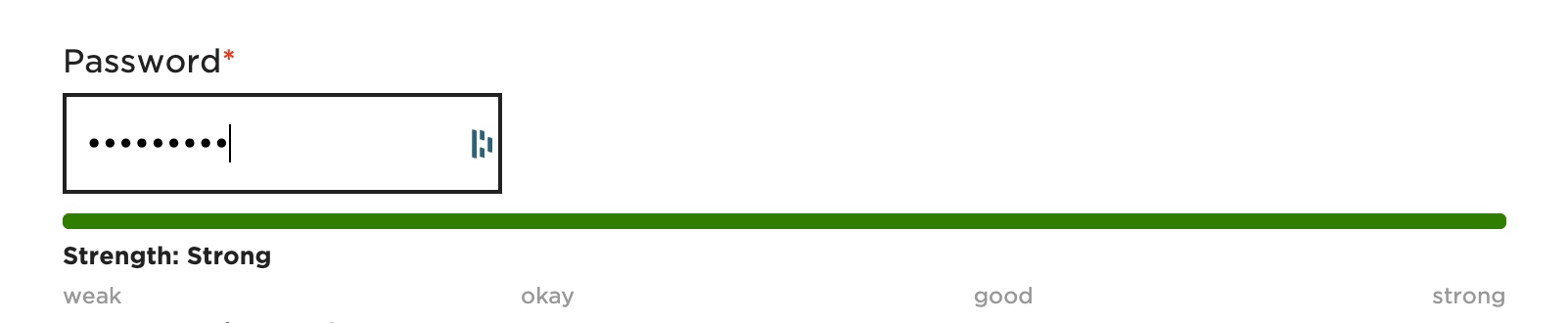
Since CMS 6.1 is launched, some things changed regarding password strength and validation in forms. To choose a password that matches the required password strength became very complicated because there is no hint for the user on their password strength at all.
Here is a small code example, with PHP, CSS and vanilla JS to add a progress bar. It helps by visualizing the password-strength.
Please keep in mind that it might not correspond with the real value, but when this was tested, it worked, so it's worth trying it out.
Note: There should be a Silverstripe-solution with 6.2.
In your registration or change password Form, insert a ConfirmedPasswordField as usual and add a CSS class to it.
ConfirmedPasswordField::create('Password', 'Password')
    ->setCanBeEmpty(true)
    ->setMinLength(4)
    ->addExtraClass('password-strength-meter')
We also need some CSS for styling the bar for showing the current password strength...
.pw-meter-wrapper {
    margin-top: 10px;
}

.pw-meter-bar {
    display: flex;
    height: 8px;
    border-radius: 3px;
    overflow: hidden;
    margin-bottom: 5px;
    background: #eee;
}

.pw-meter-segment {
    flex: 1;
    background: #ddd;
    transition: background .25s;
}

.pw-meter-labels {
    display: flex;
    justify-content: space-between;
    font-size: 11px;
    margin-top: 3px;
    color: #999;
}

.pw-meter-segment.active-1 { background: red; }
.pw-meter-segment.active-2 { background: orange; }
.pw-meter-segment.active-3 { background: gold; }
.pw-meter-segment.active-4 { background: #8ecf4f; }
.pw-meter-segment.active-5 { background: green; }

.pw-meter-status-text {
    margin-top: 5px;
    font-size: 12px;
    font-weight: bold;
}
... and some JavasScript to calculate the strength while the user types it in the form field:
document.addEventListener("DOMContentLoaded", function () {
    const pwField = document.querySelector('input[name="Password[_Password]"]');
    if (!pwField) return;

    // wrapper
    const wrapper = document.createElement('div');
    wrapper.className = "pw-meter-wrapper";

    // bar
    const bar = document.createElement('div');
    bar.className = "pw-meter-bar";

    // 5 segments
    const segments = [];
    for (let i = 0; i < 5; i++) {
        const seg = document.createElement('div');
        seg.className = "pw-meter-segment";
        bar.appendChild(seg);
        segments.push(seg);
    }

    // labels
    const labels = document.createElement('div');
    labels.className = "pw-meter-labels";
    labels.innerHTML = `
        <span>schwach</span>
        <span>okay</span>
        <span>gut</span>
        <span>stark</span>
    `;

    // status text
    const statusText = document.createElement('div');
    statusText.className = "pw-meter-status-text";

    // zusammenbauen
    wrapper.appendChild(bar);
    wrapper.appendChild(statusText);
    wrapper.appendChild(labels);

    // insert wrapper
    pwField.insertAdjacentElement('afterend', wrapper);

    // calculate strength
    pwField.addEventListener('input', function () {
        const v = pwField.value;
        let score = 0;

        if (v.length >= 8) score++;
        if (/[A-Z]/.test(v)) score++;
        if (/[a-z]/.test(v)) score++;
        if (/[0-9]/.test(v)) score++;
        if (/[^A-Za-z0-9]/.test(v)) score++;

        // reset
        segments.forEach(seg => {
            seg.className = "pw-meter-segment";
        });

        // activate segments
        for (let i = 0; i < score; i++) {
            segments[i].classList.add(`active-${score}`);
        }

        const texts = ["Very weak", "Weak", "Okay", "Good", "Strong"];
        statusText.innerHTML = "Strength: " + (texts[score - 1] || "–");
    });
});
Note: if you need to the texts translated, you can use Silverstripe's JavaScript translation feature for it.